News
History
Hardware
Software
Goodies
Downloads
Links
History
So. A good friend of mine stood in line at a recently opened Fry's store around the corner and picked up a no-name pc with decent specs for $99. It had a 1 GHz processor, 128mb RAM, and a 30 GB hard drive. A keyboard and mouse were even included as well. It came pre-loaded with Linux, but a distribution that was unfamiliar to me. Interesting computer, but I didn't see a need for another machine at the moment.
A couple of months later, I started thinking about a PVR (personal video recorder). I always miss the shows I like to watch, or worse- remember halfway though the program and miss the first half. Three choices popped to mind: Tivo, ReplayTV, or DirectTV PVR receiver? Well, I wasn't prepared to go to satellite TV, and I have some objections to the others. First, I don't feel comfortable paying for cable TV, and then paying again for an electronic program guide- especially when zap2it.com is free, as is tvguideonline.com. Second, I don't want some marketing schmo poring over my TV watching habits. I can imagine them tailoring junk mail (electronic as well as paper) to me, telemarketers calling at all hours of the evening 'Sir, I noticed you watched the discovery channel's special on the great barrier reef. I'm calling with a special offer on a six day, five night vacation package..' I don't care if they swear they'll never do that. Eventually, they will. That kind of information is more valuable than gold. How long will they sit on a gold mine before their greed overcomes their morals? Third, and most importantly, I ditched my land line. So I couldn't use a Tivo or ReplayTV anyway. Yeah, makes the whole philosophical issues seem kind of moot, but I had the objections before the land line got pulled. (ed.- Yeah, I know they have ethernet jacks now, but I didn't then.)
So the next alternative was a PC based PVR. Went to google and typed in 'PVR software'. First link was to snapstream.com. Interesting software- electronic program guide, web based scheduling, and stream to any computer (or pocketpc) on the network. Bought the software from their online store, and looked at the list of compatible TV tuners. The Hauppauge PVR-250 was listed for sale there, but I wanted to get it locally in case of problems.
I picked up a PVR-250 from Fry's and popped it into my normal desktop machine. After installing the software, I found out that Snapstream didn't support that card. Huh? It's available in their store.. Went back to their site, and guess what? It was gone. Seems they got ahead of themselves. Support for that card would be forthcoming in the next release. So here I'd bought this card and software that will not work with each other. Greeeat. That's what I get for being impulsive.
So, to see if I can turn lemons into lemonade, I search for PVR software for Linux. Aha! I stumble across mythtv.org and see the answer to all my problems. Now for a machine to put the card into (I need my desktop for gaming.)
I wasn't prepared to stand in line for hours myself at Fry's, so I kept my eye on the sale flyers. A couple of months after the opening, I noticed that same PC on sale for $199. I figured that if I took this machine, added another 128mb of RAM and a large hard drive, it'd be up to the task of running MythTV. So I picked it up, along with a 120 GB drive. I already had an extra stick of RAM, so I added it to the mix.
ThizLinux. Hrmm.. Looks like Red Hat, smells like Red Hat, but it isn't Red Hat. Trying to fix the prerequisites for MythTV got to be a daunting task. With every package I installed, the list of other packages I needed to install got larger. So I decided to just wipe the drive and install Red Hat. Rather than wait on the ISOs to download, I decided to just run to the store and pick up a boxed copy. Remember how my impetuousness got me into trouble with snapstream and the PVR-250? Not doing due diligence got me again.
As I pop in the first CD, I notice this little yellow slip of paper. Bah, documentation is for feeble geek wannabes. Boots up, starts the installer.. Umm, why is the Red Hat installer segfault'ing? Checked the little yellow slip of paper: last minute release notes: If you have a VIA Samuel III processor (C3), download the latest ISO from Red Hat's FTP. SONOFA!@#$!@#$!!
After four hours of downloading, I had a set of three Red Hat CDs. This set, however, installs Red Hat 9 just fine. Rather than start the MythTV prerequisites, I decided to work on the Video for Linux (V4L) drivers. Most cards seemed to fall under the bttv kernel module. Recompiled the kernel with v4l and bttv support, but I couldn't get it to work. Again, I got ahead of myself. So the next thing was to determine if the PVR-250 is even supported under Linux. I was in luck. The guys at ivtv are working on a driver for this card. Excellent! Wasted hours recompiling- not excellent!
Luckily, the install of the MythTV bits and pieces went well, including the ivtv driver. The PVR-250 was my choice for a few reasons. First, and foremost, I had it on hand. But even cooler, it has an MPEG-2 encoder built in. So you can slack off on processing power, and let the card do all the heavy lifting. You can actually just pipe raw data from the card and have an MPEG file (cat /dev/video0 > cap.mpg). Of course, the fact that MythTV supports this card helps, too. Trying to play this file on the Linux box doesn't seem to work, but I can take care of that later.
MythTV installed without a hitch (after changing some settings in the settings.pro file), but took a long time. Ran the setup, set the inputs on the card, and away I went. I was able to run the mythbackend program without any obvious problems. I used the MythWeb plug-in to schedule a recording and it went off without a hitch (other than the fact that the channel on the cable box needed to be changed manually.)
I had intended on making a homebrew serial port IR transmitter since the PVR-250 only has a receiver. This is important because I have digital cable. Because of that, I can't just use the TV tuner built into the PVR-250. I'll need to change the channel on the digital cable box if I want to record shows on premium channels. So at the very least, I'd need a transmitter.
I spent some time at radio shack gathering parts, and then put together the transmitter in a weekend. I put it into a red translucent project box and placed in front of the IR receiver on the cable box. Whaddya know, it worked the first time! Woo Hoo! My luck on this project is finally turning around.
When I started up mythfrontend, the interface looked fine. Unfortunately, when I tried to play the show I recorded, the playback issues I mentioned earlier came back to haunt me. Jerky, audio out of sync, it was just plain horrible. It was like looking at every 100th frame of it. Oh boy. Mplayer couldn't play back the captured video, or the live stream. Figuring that the on-board video was just plain under-powered, I picked up an ATI Radeon 9000 PCI to pop into the box.
Again, I jumped into spending money without doing my due diligence. The morass that is DRI / GATOS / ATI linux drivers quickly sucked out any spark of life I had left in me. Because the ATI card was in a PCI slot, I was basically screwed. The best I could do was get the machine to the point that I could get about ten seconds of video in sync before it started dropping frames.
I kind of left it here for a while. I couldn't think of a way to get acceptable video performance without getting a new motherboard and processor. Because this computer didn't have an AGP slot, I couldn't get a video card that has MPEG decoding supported under Linux. Bummer. Good news is that I could schedule recordings with MythWeb, and watch them on my windows PC because the recordings were just MPEG-2 videos.
One nice thing about the MythTV software is that the backend can run separate from the frontend. You can even have multiple frontends per backend, master and slave backends, or multiple tuners in one backend. So I figured I'd create a separate frontend, since the current box functioned nicely as a backend.
I thought about getting a mod chip for my X-Box. It has s-video out and would look decent in an entertainment system. Unfortunately, I know next to nothing about the X-Box modding process, and the documentation on such was a little daunting.
I'd been watching the goings on over at VIA. They were coming out with a new motherboard in the mini-itx form factor, clocked at 1 GHz. It looked especially interesting because it has an MPEG decoder on board, as well as composite and s-video out. I've used a board from VIA before, in my TAN project. Nice boards, and they appeared to have Linux support, too.
VIA released the 1 GHz board, but then a few months later, introduced the same board with a revised CPU based on a different core (Nehemiah.) Reviews and comparisons between the two showed a 20-35% increase in power for video playback. Again, I wanted to get it locally, so that necessitated a trip to Fry's. I picked up a little cube case, motherboard, and a 30 GB notebook drive. All boards made after April were supposed to have the Nehemiah core, so I figured I was safe (this was August). Unfortunately, there's no way on the box to know which revision of the board you have. And even looking at the board, there's little to differentiate them (a sticker here, a version number there.) One definite way to know is to hit the pause key during boot. One of the lines mentions the revision of the CPU as well as the core (either Ezra-T or Nehemiah.) *sigh*
After returning the board to the store, I went online. I found one retailer selling this newer version of the board. Other retailers didn't specify new or old, so I went with this one that was specifically a Nehemiah core. I was like a kid waiting for Christmas for the next two days. I got a lump of coal. I picked up the phone and chewed out the guy at the other end. After all my haranguing, this guy actually went into the warehouse, pulled one of the boards from stock, and I explained how to differentiate between the two. He thanked me for helping him get the right one (hah!) and put the new one in the mail, next day air. So then I was like a kid waiting for Christmas again- with a baseball bat, ready to crack Santa's kneecaps if he didn't bring me what I wanted.
I installed Red Hat 9 on this box, and used up2date to get everything, well, up to date. This included a newer kernel.
Video performance was horrible. I went to VIA's website looking for Linux drivers. Well, VIA doesn't know how to do Linux video drivers right. Looks like they're afraid of losing someone's IP. Can you say NDA? 'enn-dee-ayyy' VIA's answer? Release binary-only drivers tied to specific versions of specific distributions. The driver they had was for Red Hat 8.0, not 9.0.. *sigh*
While I was waiting for VIA to release a version for Red Hat 9.0, I looked around for other options. People on the MythTV mailing list reported success with that board using Gentoo Linux. That distribution gets compiled as it is installed, and includes optimizations for the MPEG decoder. I started the install, got halfway through it (days later) and realized that I'd set up the wrong compiler flags for the processor. Arrrgh! Started from scratch, got the ac3 portage sources (which include VIA CLE266 video support) and let it grind. No luck. I must have done something wrong, but I can't take days between tries to get it right. The documentation and community around Gentoo isn't as mature as, say, Red Hat, so there wasn't much in the way of troubleshooting the problem.
Back to Red Hat 9. VIA finally released a version of the binary only driver for Red Hat 9, so I was doing back flips (metaphorically, of course.) Once I got Red Hat up to date, including the latest kernel, I downloaded the VIA driver. Guess what? It wouldn't install. Apparently, not only is it tied to a specific distribution; it's tied to the stock kernel associated with that particular version of that distribution. So I rolled back the kernel and the driver installed fine. Video performance is exemplary (at the expense of having a secure / more stable / less buggy kernel.)
Since this is a frontend, it'd be nice to be able to control it with a remote. The mini-itx motherboard has an IrDA header, so I went to altex and picked up a dongle that connects to this and it seemed to be connected okay. Unfortunately, I spent the weekend trying to get Linux to recognize it. I swapped hard drives for an 80 GB one and installed XP, and XP recognized the dongle without any problems. Eventually, I found a VIA driver that worked with much hacking. Still couldn't get lirc to recognize it, however- apparently lirc doesn't build on top of the IrDA layer, it just accesses the hardware.
So that I could use a remote, I went out and bought a second PVR-250. I was also thinking about making my backend box have multiple tuners. Setting up lirc to run with the PVR-250 was pretty straightforward once I found a posting on the mailing list that indicates that you have to use the latest CVS sources. The remote worked great as a mouse, but I was having trouble setting it up to work with MythTV.
I checked the documentation at mythtv.org, and they have a section on using MythTV with the PVR-250's remote. I needed to recompile MythTV with a few extra flags. Once I did so, MythTV recognized the remote natively. Works beautifully now, both as a mouse, and as a control for MythTV.
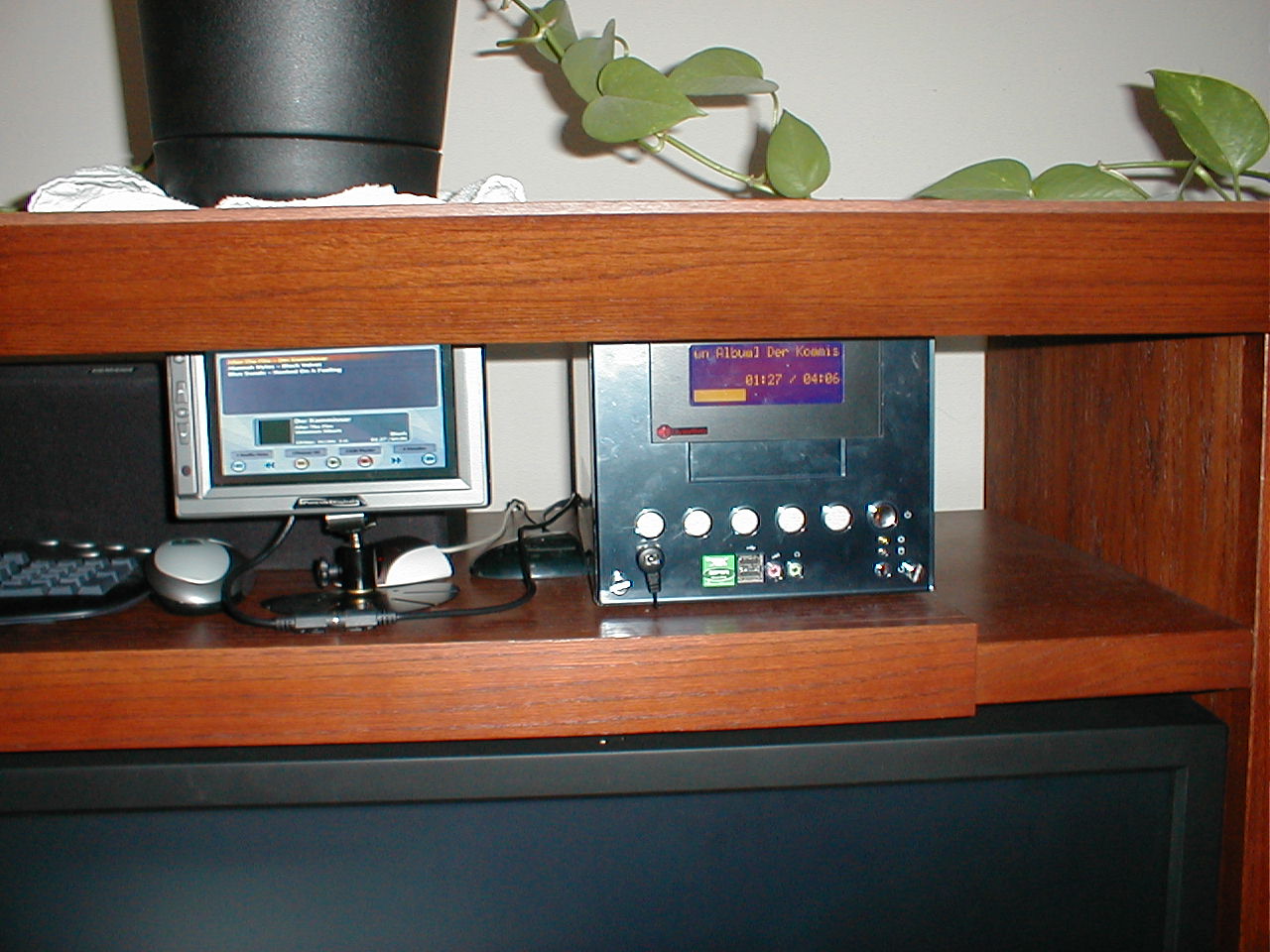
While checking out the MythTV mailing list, I noticed that someone is working on support for LCDs on boxes running the mythfrontend. Unfortunately, it only supports the stable version of LCDproc, and it meant a recompile of MythTV with LCD support enabled. Even though it's a bit rudimentary, it looks cool.
So I picked up another goodie for this little box- a CrystalFontz LCD display. It's 20 characters by 4 lines, and fits into two 5 ¼. drive bays. It.s a nice addition to the case, and really helps validate the case as an 'appliance'. LCDproc is the software most often used to control LCDs running on linux, and the support for mine was first rate in the stable branch of the code.
I wanted to play with some of the more advanced features that the display was capable of, so I upgraded to the CVS version of LCDproc. I'm not a C coder by any stretch of the imagination, but I played one via email- I found a couple of bugs with the driver for my display and posted them to the list. There are still a lot of bugs in the CVS branch, but most of them looked like something I could tackle. I've had problems with the CGROM mis-mapping ascii characters to european characters in the CFontz 634 module, so I patched the driver to do a substitution on a character by character basis. It actually made LCDProc run faster. Imagine that! I also modified the connector so that the screen powers on at boot time, instead of only when LCDproc starts. I modified the boot screen to have a neat little MythTV logo, that stays onscreen until LCDproc starts up.
I finally put the frontend in the living room, after crawling around in the attic to drop an ethernet cable, and connected it up to the big screen. Looks more like an appliance than a computer, but it's a lot louder than I realized. I guess sitting here with two other machines beside me, I never noticed. I may try to find a DC-DC power supply like the one I used in the TAN project. I should be able to use that, since the only thing besides the motherboard using power is the LCD and the hard drive.
I admit it, I'm hooked. I've dutifully upgraded every time a new release has come out. (At first, I tried upgrading to CVS every couple of days, but the wife QUICKLY squashed that practice. The WAF, it is HIGH with this one.) We record about 20-30 shows a week, mostly stuff on the weekends that are either too early or too late at night.
I've since set up a cheap box in my office (AMD XP2500, GeForce4 440 AGP) as a frontend for me. Works awesome, and it's wicked fast. Not very stable tho- locks up hard with the power button and keyboard lights flashing. Still working out the kinks. It's not Myth, so it's probably linux or my hardware. Not a big deal, since it's just a frontend for me. I haven't dedicated much time to fixing it yet.
For Valentine's Day, I put together another frontend for the wife. It's in the bedroom, mostly because I nicked the digital cable tuner in there to use with the backend. For an IR receiver, I picked up an irman from CrystalFontz. The epia m1k has a serial port header on the motherboard. So I deboned the irman down to a circuit board and wired it directly to the second serial port. I then took one of the full size drive bay inserts out, and skinned the plastic cover from it. After tracing the shape of the receiver on the back of the insert, a dremel removed it nicely. I took some scrap aluminum and fabbed up a mounting bracket and mounted the circuit board in the new hole. Unless you get right up to it, you never notice the receiver.
I noticed that I had a lot of storage scattered among various machines, so that got me thinking. The backend machine has all the videos, one frontend is my mp3 repository, and the other.. well, it's got a lot of space. So I cross-connected everything with NFS so that all machines have access to all the data. I still have a 90 gig partition to fill up as well as 80 gigs on my frontend here in my office. If I ever get MythGame set up, maybe I can drop ROMs in there.